Archive for the ‘General’ Category

WOW! Multi-core processing a snap with Spring 3

Thursday, September 2nd, 2010

For many years, processor speed was measured by the frequency of the processor (the number of MHz or GHz). As chip makers have squeezed more and more transistors into the same amount of space, physical limitations have prevented processors from running at faster frequencies. So, to keep creating gains in processor speed, chipmakers have increased the number of cores on the processor instead of raising the frequency. Additional cores allow the processor to do additional things at once. For example, if there are 4 cores that is theoretically 4 times more powerful than a processor with 1 core running at the same frequency.

In practice, most programmers are not used to supporting multiple processors, so the software they write can only take advantage of a single core. This means all that extra processing power sits idle. Fortunately, the Spring team, along with the rest of the Java community, has come up with a very elegant approach to supporting multiple processors.

Today for my R&D project, I changed our background score calculation process so that it can take advantage of more than one processor core. It only took a couple hours from the time I started reading the documentation to the time I had my code working. I couldn’t believe how easy it was! I will definitely keep an eye out for other places in our software that could take better advantage of multiple processing cores.

For the technical folks out there, here are the resources I used to get me up to speed so quickly. I used Spring’s @Async annotation, Java 5’s java.util.concurrent.Future class and Spring’s org.springframework.scheduling.annotation.AsyncResult.

SOAP Testing

Friday, May 14th, 2010

Spider has done a significant amount of Web service extensions to our Scoreboard software throughout the past several years. Connect is a tool that uses these Web services to easily integrate data from existing sources into Scoreboard. I’ve personally found Web service technologies to be quite fascinatingly rewarding to work with.

What’s so different about Web service coding, however, as opposed to typical web application programming, is the way that you can make sure your code is working as expected.

When building a typical web application, you can write your code, deploy it, and view it through your web browser. When building any sort of SOA functionality though, all communication is done through code…not quite as “visual” (unless you’re also writing a bunch of extra logging code), and arguably a bit more difficult to debug.

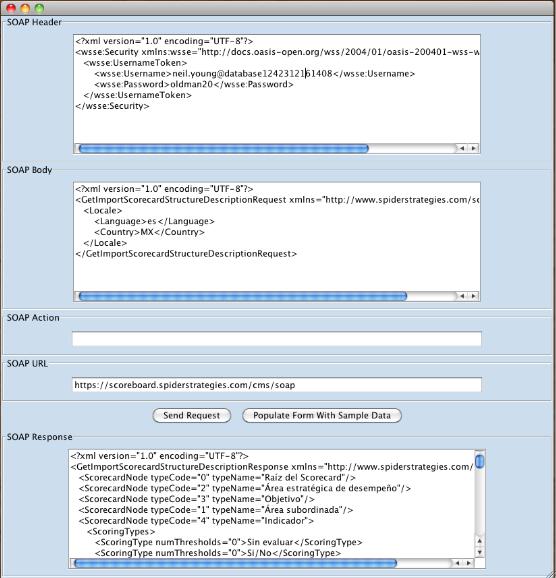
I wanted a quick way to test out the Web services that Scoreboard was providing…similar to the way that you might use a SQL console to test out your queries before you throw them into your application.

Of course there are plenty of development tools out there that will explore a WSDL, tell you which endpoints are available, and help you to build clients and POJO’s to use those services…but I wanted something simpler.

I already knew exactly what my endpoints were, and what the SOAP messages should look like, it was just a matter of ensuring that they were working as expected. I wanted to send a simple SOAP message, and see what the response looked like before I started writing client code that would consume those services.

Perhaps I just didn’t look hard enough, but I couldn’t find any tools out there that were a simple “form” that I could throw a SOAP header, body, and URL into, and send them off for a response.

Thus, I built my own. It’s a pretty simple Java Swing application that runs completely independent of both Scoreboard and Connect. I’m looking forward to it relieving many headaches related to analyzing JDOM elements through my Eclipse debugger!

A sample SOAP request, retrieving data from Scoreboard

The source code, as well as an executable JAR file can be downloaded here.

10 Principles of Successful Web Apps

Thursday, April 15th, 2010

Fred Wilson talks about what has made his web apps successful. Not everything perfectly applies to Spider Strategies, but it’s good advice none the less.

WOBs Are Wonderful!

Wednesday, April 7th, 2010

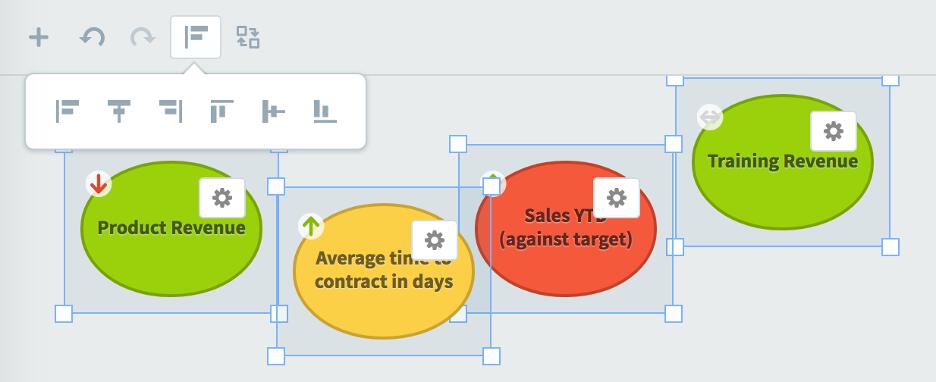
Our users are telling us that WOBs™ are Wonderful. Using WOBs, you can create dashboards just like you create static slides with standard presentation software. WOBs are resizable objects that create stunning displays of your data in Scoreboard or QuickScore. WOBs can create resizable

  • Text
  • Pictures
  • Scorecard Nodes with configuration options for what they display
  • Speedometers
  • Gauges
  • Charts
  • Graphs
  • Gannt Charts
  • and all of that on top of a background image if needed.

WOBs are a wonderful, fluid, configurable AND exportable set of objects that offer our customers a major method for creating powerful information displays that can be bound in Briefing Books, set as the login page, exported to MS Office apps as well as embedded instantly into emails sent from the app!

With WOBs, “Dashboards” are much, much more than the word implies!

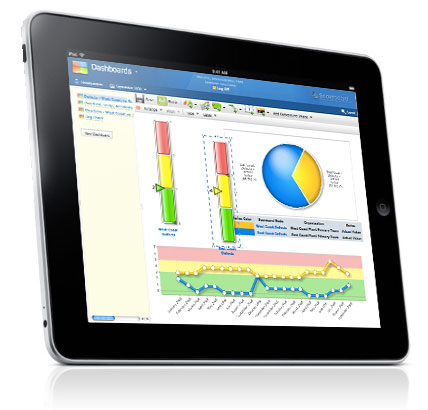
Pie Chart, Guage and Line Graph WOBs

Pie Chart, Guage and Line Graph WOBs

Dashboard WOBs on an iPad

Dashboard WOBs on an iPad

An example of text, scorecard node and chart WOBs

An example of text, scorecard node and chart WOBs

Stunning Dashboard by Scott O'Reilly

Stunning Dashboard by Scott O'Reilly

Actual Spider Strategies WOB Dashboard

I LOVE Scoreboard!!!!

Friday, February 12th, 2010

Some time ago I wrote about “eating our own dog food”. At the time, our application, Scoreboard was useful for our P&L monthly analysis. At the time, we had only created a few calculated KPIs from the P and L import with Connect. Today we have a rich collection of calculated KPIs that REALLY help us manage our business. My favorite is the ability to do rolling average calculated metrics instead of just “this period versus this period goal” as is so often the case with Dashboard and BSC software. We use a lot of rolling average views, 3 month rolling average, 6 month and 12 month. Then we make gauge dashboards for the current period and quad chart chart dashboards for the multiple period view.

But what do I REALLY love? Every month I prepare a presentation on the previous month’s performance. I have it in a “Briefing Book” that doesn’t change except for the date. So make it once, use it always! That’s a lot easier than updating slides! BUT what I really love is that every month, after updating the dates, I send our performance management briefing book to Microsoft PowerPoint and then EMAIL the whole presentation to our executive team for read ahead before our meeting. Sometimes, they just go through the slides and email back “looks good to me, let’s not meet!”

Here’s an example slide (it is real data).

I LOVE Scoreboard!!!
blogpost

Doing the “right” thing

Monday, February 1st, 2010

iPad

I’ve been thinking a lot lately about Apple’s new iPad and its lack of support for Flash graphics.  This is clearly a strategic move by Apple away from a closed technology that is fully owned by one company.  Feel free to see the irony there.

Regardless of how you feel about Apple, however, they do have a solid track record of making early, bold choices that the rest of industry follows.  Remember floppy disks?  I think Flash will continue to be supported on traditional computers for quite a while, but its heyday is behind us.  HTML 5 and native cross-platform vector graphics are the future.

Which brings me to the point of this post.

When we started writing our dashboards functionality over a year ago we had some tough choices to make.  We had an aggressive vision of creating dashboards with freeform layout, allowing users to easily move and resize objects on a blank canvas.  Think PowerPoint, as opposed to shuffling uniformly sized content boxes.  If we could pull it off we’d be lightyears ahead of our competitors.

The easy road would have been to use Flash to power our dashboards.  It was a mature, widely used technology, but something didn’t feel right.  Flash required a browser plugin, and regardless of how ubiquitous it was, it didn’t fit with the philosophy of the open web.

Instead we decided to code our dashboards in 100% HTML, CSS, and JavaScript.  It wasn’t the easiest development path, or the quickest, but we felt it was the “right” thing to do.

It’s now a year later, and our customers love the new software.  Our dashboards are everything we hoped they’d be, and our architectural decision to forgo Flash was a distant memory.

Until today.

While our flash-based competitors are scrambling to explain why devices like the iPad aren’t important, we leave that choice to our customers and just ship software that works everywhere.

To be fair, there’s no way we could have known the iPad was coming.  We didn’t have a crystal ball or some sort of extraordinary insight that others didn’t.  What we did have, though, is a development philosophy that favors open standards and cutting-edge research and development.

I couldn’t be more happy with where our software is today.

New option to turn off shiny graphics

Monday, January 25th, 2010

Our new graphics in Scoreboard have been incredibly well received.  Some of our defense clients, however, prefer a flatter and more reserved look.  For them we’re introducing a configuration option in Scoreboard 2.2 to turn off shiny graphics.  The screenshots below show different graphs with the option turned on and off.
shiny-images

We’re hiring!

Friday, January 15th, 2010

If you are Java/web developer or know one, please check our job posting!

More stunning dashboards from Scott

Thursday, December 3rd, 2009

Check these out!

Dashboard 1

Here is an example of a quad chart, which is a popular chart in the US Army.

Dashboard 2

You can even upload maps to view real-time geographic performance data!

Dashboard 3

Here’s an example with a Polar chart. You can really squeeze a ton of data into a presentation that is easy to understand at a glance!

Dashboard 4

Eating Your Own Dog Food

Sunday, October 11th, 2009

We have been writing pretty decent software for over 6 years now and we’ve always wanted to use it. After all, everyone says that you should “eat your own dog food”, a phrase that Wikipedia says came about because “Microsoft manager Paul Maritz sent Brian Valentine, test manager for Microsoft LAN Manager, an email titled “Eating our own Dogfood” challenging him to increase internal usage of the company’s product”.

But the fact is, it didn’t work for us. As a small business, we could measure both our strategic and tactical success by looking at about 10 KPIs. You don’t need an enterprise class performance management application to do that.

But then in August, we introduced Spider Connect™ and Scoreboard® with absolutely incredible WOBs™ (web Windowed Objects) and everything changed.

All of a sudden we could create a scorecard reflection of our monthly P&L quickly and easily, export the P&L to Excel, read it and map the data fields in the spreadsheet and import the data into Scoreboard®.

THEN, in Scoreboard® we could create absolutely incredible Dashboards for visual analysis of the data. We could put those Dashboards into Briefing Books and export them to slide presentations that we could share via email and discuss at management meetings.

Overnight, our software became a genuinely critical part of assessing our performance and actioning improvement.

Wow does that make an incredible difference in the way I see our market. We are still a very small business and we still have clients who are the largest Fortune 100 companies in the world as well as the US Army which is the largest organization in the world. But if WE find our software indispensable, ANY organization needs Scoreboard® and Spider Connect™!

We not only imported our P&L but we could easily create new KPIs from the P&L data that give us critical insight into our goal attainment. For instance, we want to see our licensing and hosting revenue increase by at least 2.5% month to month, but ideally 5% month to month so that we achieve a 70% increase over 12 months.

Here’s what that looks like in Scoreboard!

dashboard